A local LLM for Odoo: the AI works on your data, within boundaries you control.
ERP tenders keep coming back to three questions: where the data lives, who can access it and how you get out. With local AI, the language model and the search index run on infrastructure you control. We connect it to Odoo, your knowledge base and your internal documents. Answers link back to the source documents they were drawn from.
Gold
Odoo Partner.
280+
Odoo experts.
900+
customer references.
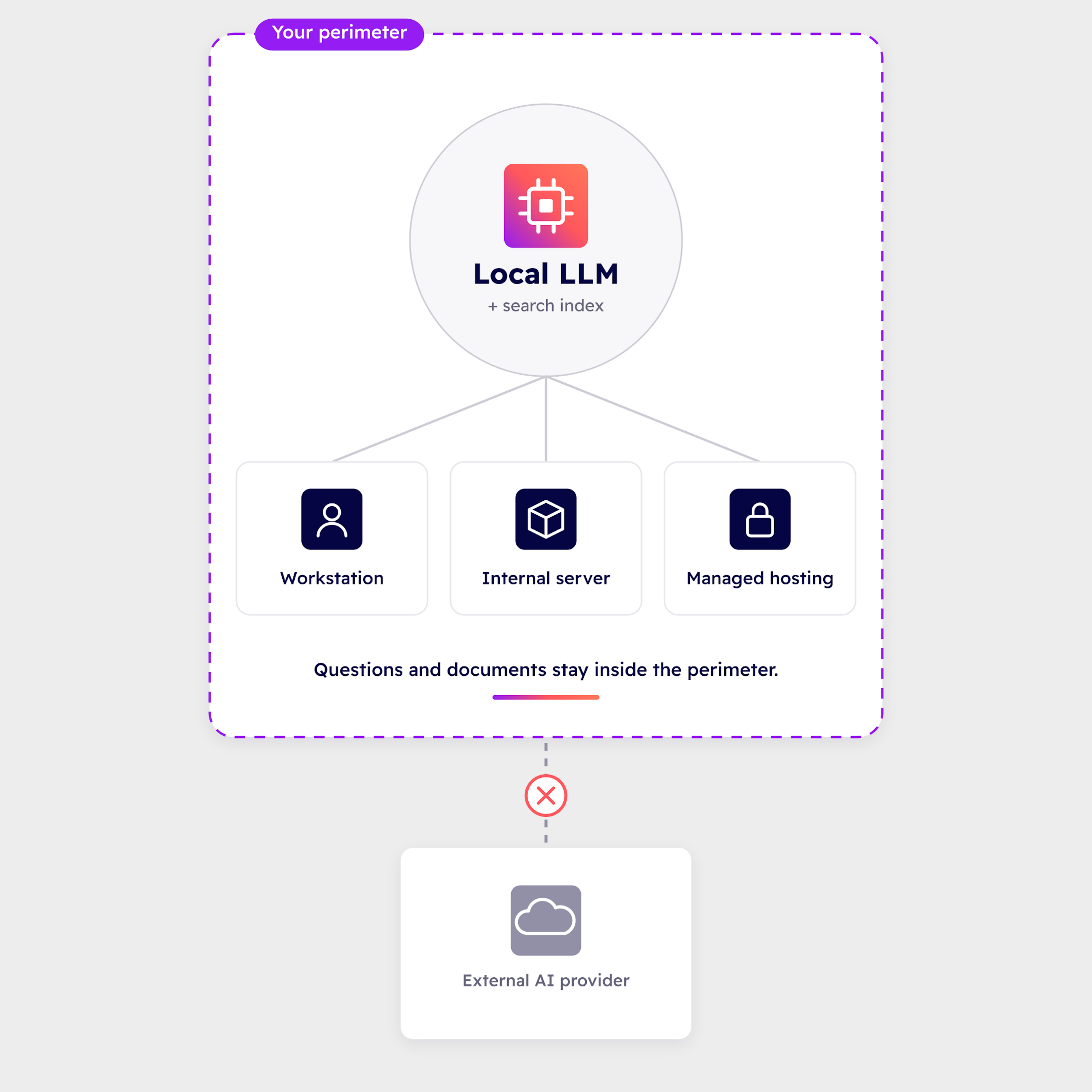
Local AI runs on your infrastructure, not the provider's.
A local LLM is a language model installed on a machine you control: a workstation, an internal server or managed hosting. Your questions and documents stay within that perimeter. Local does not mean a single workstation: we choose the hosting with you, based on how sensitive the data is.
People often talk about sovereign AI. The term covers very different things depending on the provider. We prefer to talk about control: you know where the model runs, where queries go and how to get out.
Local AI is a choice of control, not raw performance. We say so from the first conversation.
Three questions
Where your data lives, who can access it, how you get out.
Your legal and cybersecurity teams ask these three questions. Local AI answers each one.
Location
The language model and the search index run on a machine you control: workstation, internal server or managed hosting.
Governance
When you connect an AI to Odoo, Dynapps’ MCP server limits what it can see, masks the fields you choose and logs every call.
Reversibility
Your Odoo database (PostgreSQL), a standard Qdrant index and open models. No proprietary lock-in on either the AI or the data.
Local AI or cloud AI: the choice depends on how sensitive your data is.
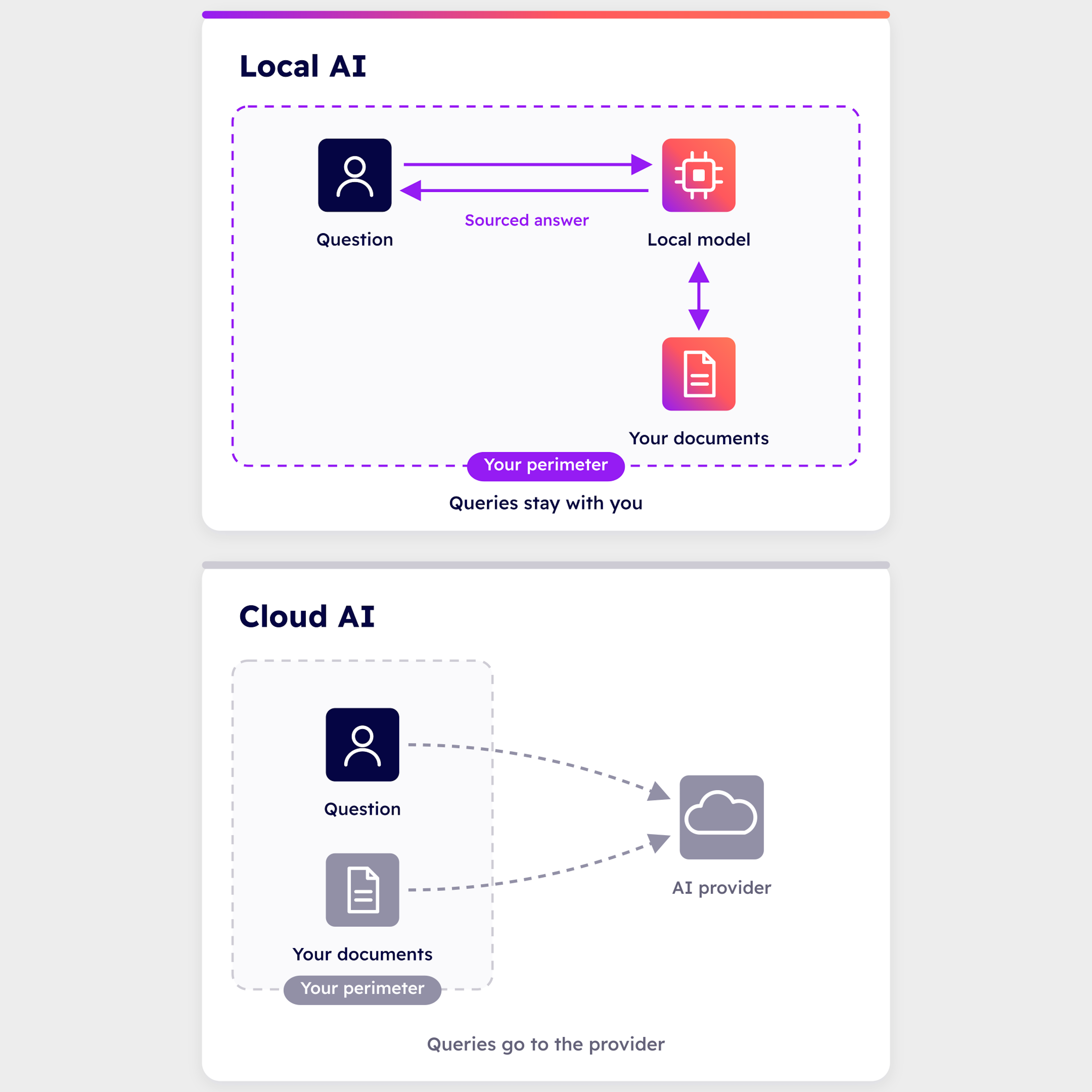
We do not sell one AI against the other. Cloud AI (OpenAI, Gemini, Claude) delivers high quality on general tasks and gets you started quickly, with no hardware to buy. Your queries then go to the provider.
Local AI suits sensitive data (finance, HR), internal documentation, or any case where you want to control the infrastructure. Queries stay within the perimeter you choose. Answer quality depends on the hardware: the larger the model, the better the answers in French.
In Odoo 20, native AI goes through a service operated by Odoo and billed in credits. According to the code, AI fields only work with OpenAI. Claude, Mistral or local AI are the alternatives, depending on your data.
How it works
From your documents to an answer that cites its sources.
This is RAG (retrieval-augmented generation) applied to your internal documents. Search works on meaning: a question about setting up invoicing finds the right article, even when the article uses different words.
01 We read your sources
The AI indexes articles from the Odoo knowledge base, your OneDrive or SharePoint documents (Word, PDF) and your project data. You choose the sources and the scope.
02 We split and index them
We break content down into passages and store them in a local search database that can be queried by meaning and by keyword. Only documents that have changed are re-indexed.
03 You ask your question in plain language
The local model answers from the passages it retrieves. Every answer links back to the original documents.
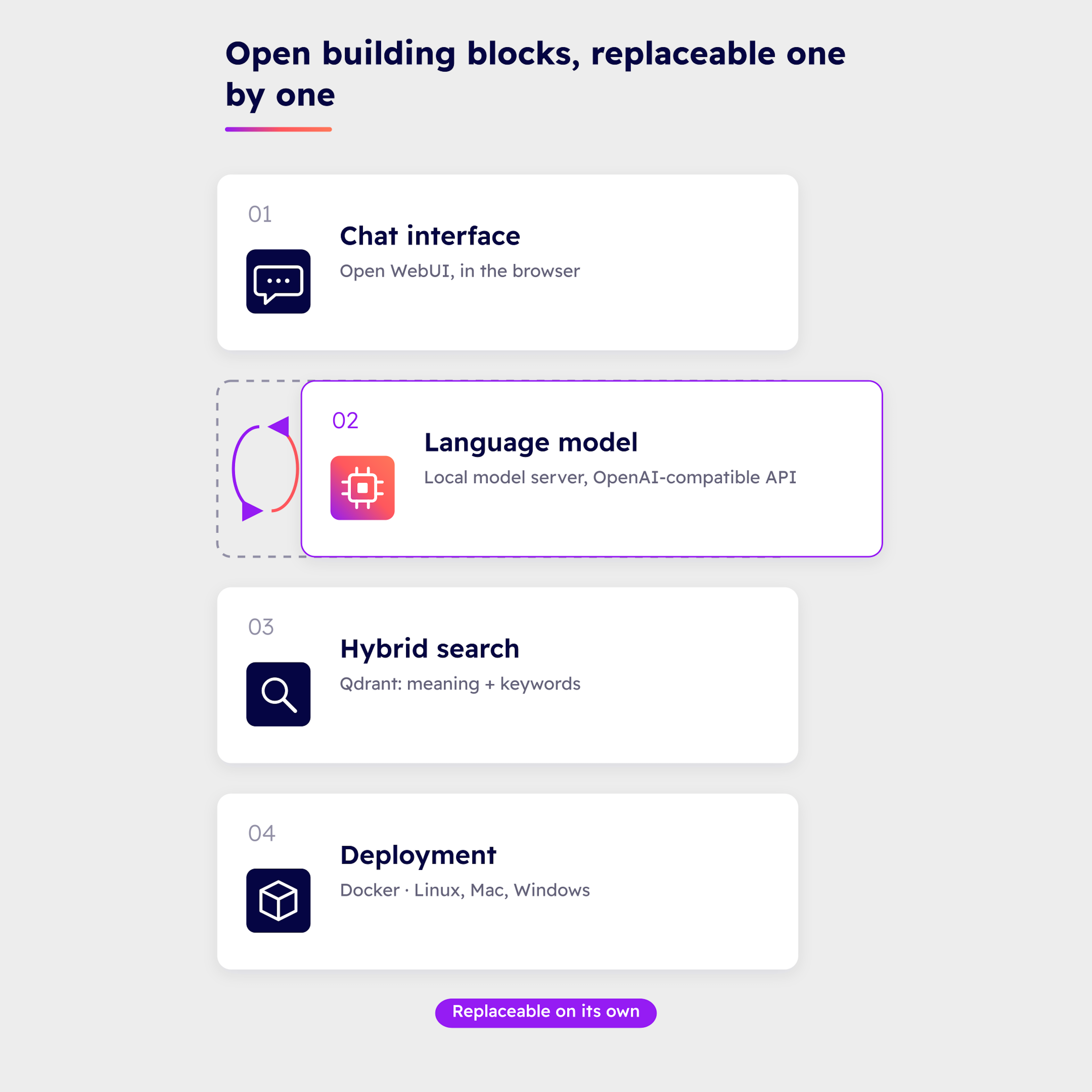
Open building blocks, assembled by Dynapps, that you can swap out one at a time.
The language model runs on a local model server compatible with the OpenAI API. By default, we use Qwen 3.5, at 4, 9 or 27 billion parameters. The product detects the available video memory (or unified memory on a Mac) and picks the model size to match: under 10 GB, 10 to 20 GB, or 20 GB and above.
Search combines keywords and meaning in a local Qdrant database. A second model can re-rank the top passages before the answer is generated. Your teams use a browser-based chat interface, Open WebUI.
The whole stack is deployed with Docker on Linux (NVIDIA GPU recommended, CPU-only also possible). On Apple Silicon Macs and on Windows, the model server runs natively. An evaluation tool scores answers against a set of benchmark questions and can block the switch to a new index if it makes them worse.
Hosting
Three ways to host local AI.
Local does not mean a single workstation. We choose the hosting with you, based on how sensitive your data is.
Your own workstation or server
Maximum control: your data never leaves the premises. You look after the hardware, backups and updates.
DynCloud
Hosting managed by Dynapps with Combell since 2023, in Belgian data centres (Diegem and Zaventem). Data processed and stored in Europe. The Dynapps group and Combell are ISO 27001 certified. Backups every 4 hours, with one daily backup kept for 30 days. Unlike Odoo.sh, DynCloud lets you run an AI server alongside Odoo, with server access, VPN and IP allowlisting.
Odoo Online and Odoo.sh
Local AI does not run here: both are hosted on Google Cloud, the infrastructure of a US provider. You can still connect an AI to them through an MCP server.
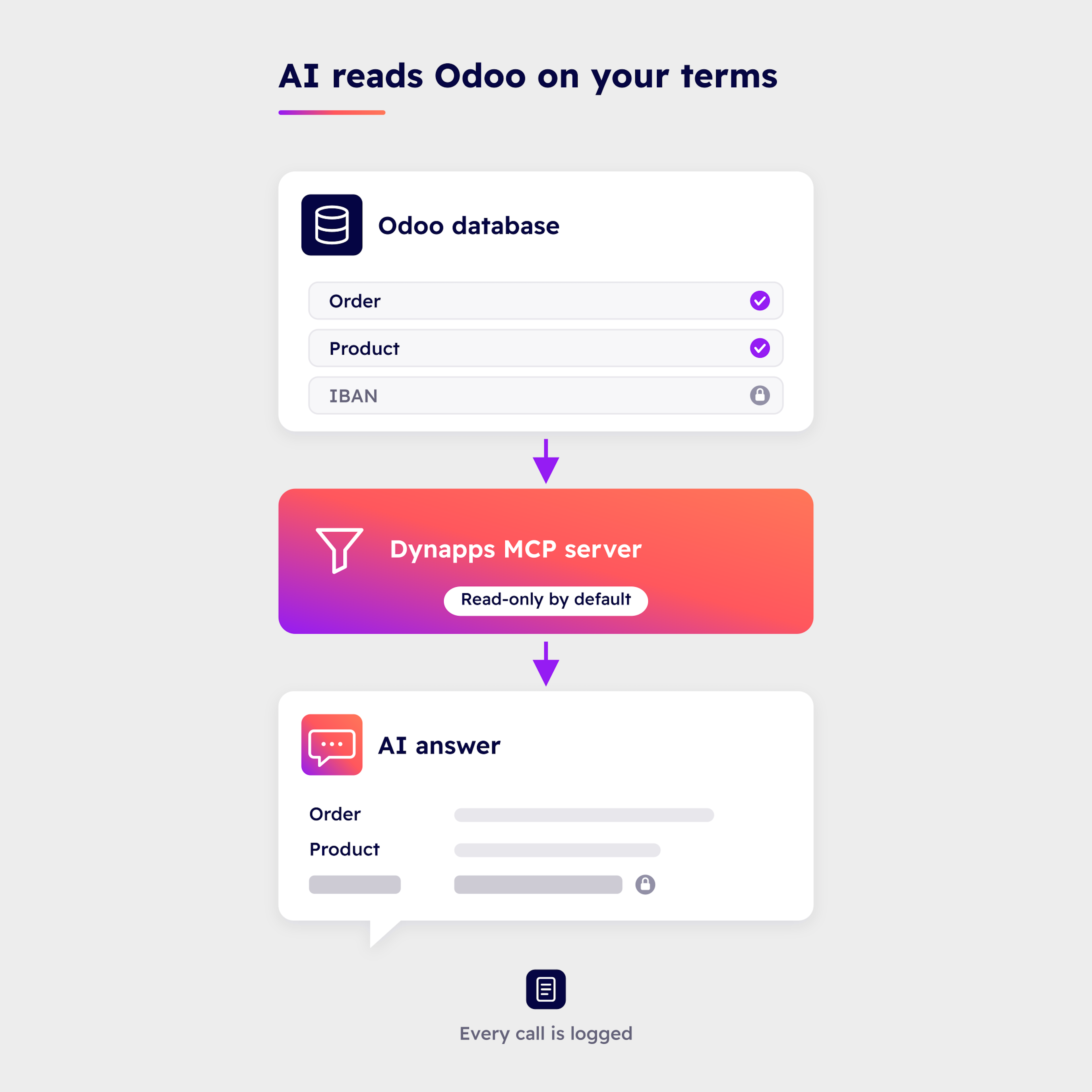
The MCP server: AI reads Odoo on your terms.
For an AI to read from or write to Odoo, we put a controlled layer between the two rather than handing over an API key with full access. That is the job of Dynapps’ MCP (Model Context Protocol) server.
Only the models and fields on the list are visible, with one server per audience: sales, finance, support. Five masking strategies hide personal and financial data before it leaves Odoo. An audit trail logs every call, and a kill switch revokes all tokens at once.
It only writes to Odoo on the models, fields and operations you authorise. The connected AI (Claude, Mistral or another) processes the data you give it access to on its provider’s infrastructure. Dynapps runs this server in production with Claude and Mistral.
Industries
The industries where the data question comes first.
Financial data, HR files, internal documentation: in these industries, knowing where the AI runs is part of the specification.


Dynapps success stories
Read testimonials about AI projects.
Our offer
Three steps, from audit to integration.
You move one step at a time, at your pace and based on how sensitive your data is.
Audit
A first-level assessment: your data, access, exit route and the place of AI.
Team onboarding
We train your teams on the AI you choose.
Integration
We set up hosting, access, backups, reversibility and the AI.
Everything you need to know about local AI in Odoo.
A language model installed on a machine you control: a workstation, an internal server, or managed hosting. Your questions and documents do not go to an AI provider.
Whether for finance, HR, or internal documentation, local AI keeps queries within your organisation. For general tasks, cloud AI delivers high quality and gets up and running faster. We help you determine the best way to allocate these uses.
There is no single definition of the term “sovereign AI.” A local AI gives you control over where the model runs and where requests are sent. The actual level of sovereignty also depends on the hosting provider, the contracts, and your own rules.
Not always. The quality depends on the hardware and the size of the model. We check it using your own documents before recommending a configuration.
That depends on the available video memory (or unified memory on a Mac). The product selects a profile automatically: a compact model under 10 GB or with no GPU, a standard model from 10 to 20 GB, and a larger model from 20 GB upwards.
No, the local AI does not run on these plans, which are hosted on Google Cloud. You can connect an AI to them via an MCP server, or host Odoo and the AI on DynCloud or on your own servers.
Odoo Knowledge articles, OneDrive or SharePoint documents (Word, PDF, Markdown, HTML), project data, CRM, Helpdesk, and GitHub repositories. You enable each source separately and decide which content to index.
No, not on its own. Compliance with the GDPR, NIS2, or the AI Act remains your responsibility. Local AI provides you with concrete tools: data localisation, restricted access, traceability, and reversibility.
Put AI to work on your data, on your own premises.
A first conversation to review your data, your access rules and the role of AI, then choose between local and cloud AI.