Connect an AI to Odoo without giving it full access to the ERP.
What an MCP server exposes to the AI, what it hides, who can connect to it, and where its guarantees end.

A team asks you to connect Claude, ChatGPT or Cursor to Odoo. The fast route exists: create an API user, generate a key, paste it into the AI client. The assistant reads your database within minutes.
It also reads contacts, salaries and margins. Whatever the API user can see, the AI sees. Whatever it can write, the AI can write. That is hard to defend in front of a security committee.
The Model Context Protocol (MCP) moves that starting point. The questions to settle are the ones data sovereignty raises: what leaves, who reaches it, how to cut it off. This post covers what a governed MCP server exposes, what it masks, who can connect to it, what it takes to set one up, and where its guarantees stop.
Not to be confused with the Odoo artificial intelligence module, which is enabled inside the product and has conditions of its own. This is about opening your Odoo data to an external AI client.
Why is an API key not enough?
An API key gives the AI client exactly the rights of the user it belongs to. One access level, no granularity per audience, no distinction between a sales assistant and an automated agent.
The Dynapps MCP server sits as a controlled layer between the AI client and Odoo. Each audience reaches the data and the actions you decide.
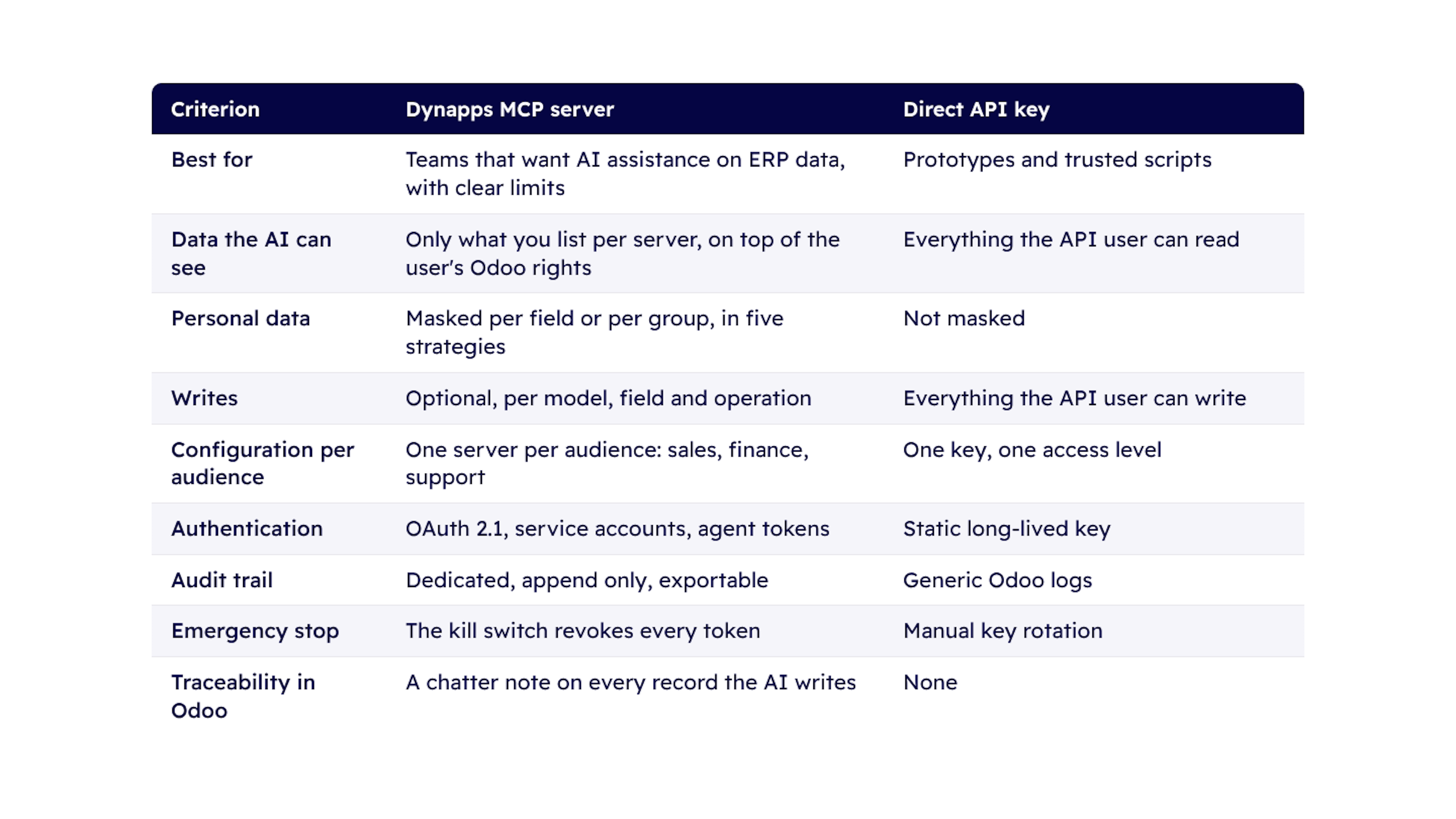
Three differences decide it in practice: the AI sees only the fields you list, personal data leaves masked, and one switch revokes every access. An API key offers none of the three.
An API key still fits prototypes and trusted scripts. As soon as access leaves the team that created it, the level of detail falls short.
What is an MCP server for Odoo?
An MCP server is a controlled layer between the AI client and Odoo. It exposes only the models and fields you list, masks personal data before it leaves Odoo, limits writes and logs every call.
Exposure starts from a positive list.
A server exposes only the models and fields you add to its list. Everything else does not exist for the AI client.
The most sensitive models, users, access rights and system parameters, are blocked by default.
The list adds to the user's Odoo access rights. It does not replace them.
A wider scope stays possible for trusted audiences, with the caveats described below.
Masking works field by field.
Personal and financial data is masked before it leaves Odoo. The rules group into reusable sets: basic personal data, sensitive personal data, identifiers, financial, hashed identity.
Five strategies decide what the AI client actually sees. Full masking replaces the value with a marker. Partial masking leaves part of it visible, for example the end of an email. A hash produces a stable fingerprint, which keeps records matchable without ever revealing the value. A category substitutes a coarse band for the exact figure. And a consistent fake returns a realistic substitute, identical every time for the same value, useful when the AI has to work on plausible data without seeing the real thing.
Writes stay closed by default.
A server stays read-only until you decide otherwise. The AI client has a fixed set of tools: search, read and aggregate, then, if you allow it, create, update, post in the chatter or send an email. Every call runs through the same circuit: authentication, scope, exposure, masking and audit.
Allowed writes are allowed model by model, field by field, operation by operation.
Bulk changes beyond a threshold require a confirmation.
Deletions are disabled unless explicitly enabled.
Writes stay limited by default to the company of the token.
Every call leaves a trace.
Connections, tool calls and configuration changes land in an append-only audit trail that nobody can rewrite after the fact. The export is tamper-evident and verifiable without Odoo, which makes it hold up in an audit. And every record the AI writes carries a note in its chatter, for example Created by ChatGPT.
Who can log in, and with which rights?
Three types of caller share the same access model. The AI client acts as an Odoo user, stays subject to its access rights and record rules, then is restricted again by the server configuration.
Internal users, by default: employees connect their own AI client and authenticate through OAuth 2.1. Each server lists the allowed groups or users.
Agents, for automation: autonomous clients receive a dedicated identity, tied to one server and one company, with a renewable token, expiry reminders and an allowed IP list.
Portal users, optional: external customers or contacts see only what their portal rights give them, never attachments, never high-privilege tools.
A server can restrict allowed IP addresses and origins. Tokens are tied to a server: moving or renaming a server revokes the tokens issued for it. The global kill switch revokes every live token, agents included, and stays active until you turn it off.
The Dynapps recommendation: one server per audience. A sales assistant, a financial controller and an automated agent do not share the same exposure. Servers are easy to create and clone, and each has its own groups, masking, limits and audit view.
How do you set up your first server?
A typical setup takes a few minutes, once you know which data the audience needs. The five decisions to make, in order.
The audience and the perimeter. The wizard asks for the server name and the companies involved, then shows a review step listing in plain language everything the server will refuse.
The exposed models and the masking group. Masking starts from the basic personal data group. To keep a piece of personal data entirely away from the AI, leave the field off the list rather than relying on masking.
The write posture. Leave the server read-only, or open writes model by model.
Connecting the client. Adding the server address to the AI client is enough: authentication negotiates itself. No key to distribute, no secret travelling by email.
Verification. Before opening access, you see the identity and scope actually granted, and the masked result exactly as the AI client will receive it.
Sensible guardrails apply from the start and adjust per server: 60 requests per minute, 100 records per read, 12 default fields per model, and a confirmation required beyond 20 records changed at once. An AI client that runs away therefore hits a ceiling before it weighs on your production.
On the technical side, the server needs Odoo 19 and a Dynapps module, under the OPL-1 licence. It runs on any Odoo 19 deployment, DynCloud included. Which hosting mode your Odoo runs on stays a separate decision, with sovereignty criteria of its own.
Where do the guarantees stop?
Three limits are worth knowing before you go live. We would rather tell you than let you find out.
A wider scope weakens masking.
If you open a server to everything the user can see, masking no longer holds field by field: values copied elsewhere, composed addresses, formatted emails, search helpers, escape the rules. For a firm guarantee, stay on the positive list.
Code tools are never fully sandboxed.
An administrator can add custom tools, including tools that run code. Those run in a restricted sandbox, but arbitrary code cannot be fully contained. They are created inactive and should be reviewed and enabled by a trusted administrator only.
Open signup and portal access combine badly.
If portal users are admitted on a server and signup to your portal is open, any visitor who registers can connect, within their own rights. List portal users one by one, or restrict signup.
Why Dynapps?
We are an Odoo Gold Partner and ISO 27001 certified, with 900+ customer references and 280+ Odoo experts across five countries. For an MCP server we start from the audience you want to serve first and the data it needs, then propose a configuration with the right exposure, masking and write posture, and set it up with you.
Conclusion.
The question is not whether AI will reach your ERP. It is who decides that access, field by field, audience by audience. A governed MCP server makes that decision explicit, reversible and auditable.
Discover what Odoo can do for your business.
A first conversation to see if we fit, followed by a demo built around your processes.
More posts like this

6 minute read
Sovereign Odoo hosting: which model should you choose?
Odoo Online, Odoo.sh, DynCloud or managed hosting: the real limitations of each option, and where your data is stored.
3 minute read
AI in Odoo: What are the requirements for enabling it?
The question "Do we have the right to use Odoo's AI?" often has a simpler answer than expected.
3 minute read
Digital sovereignty: what your ERP must demonstrate.
Where is your data, who has access to it, and how to get it out. The guarantees that an ERP system actually provides, and those that are just marketing talk.